
Download Fiddler Everywhere – free web debugging proxy tool for Windows, macOS, Linux, Android & iOS
Introduction & Overview
Fiddler Everywhere is a modern, cross‑platform web debugging proxy that lets developers, testers, and IT professionals capture, inspect, and modify HTTP and HTTPS traffic in real time. Originally created by Eric Lawrence and now maintained by the Telerik team, this free tool has evolved from the classic Windows‑only Fiddler to a sleek, multi‑OS application that works on Windows, macOS, and Linux, with companion mobile apps for Android and iOS. Whether you’re troubleshooting API calls, debugging web‑site performance, or simulating server responses, Fiddler Everywhere offers a visual interface and powerful scripting capabilities that make complex network analysis approachable for beginners and efficient for power users.
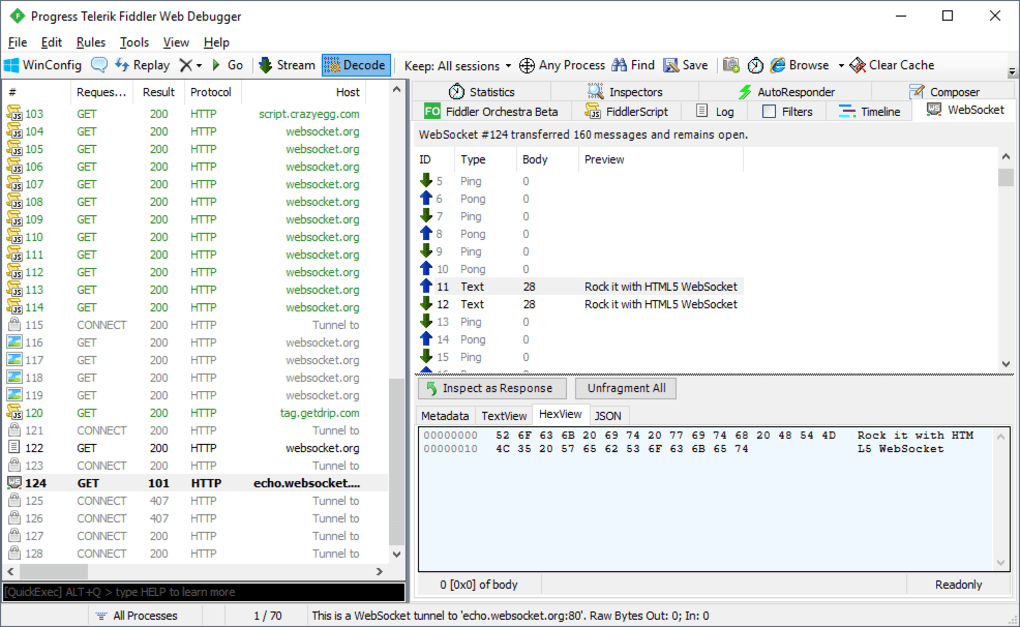
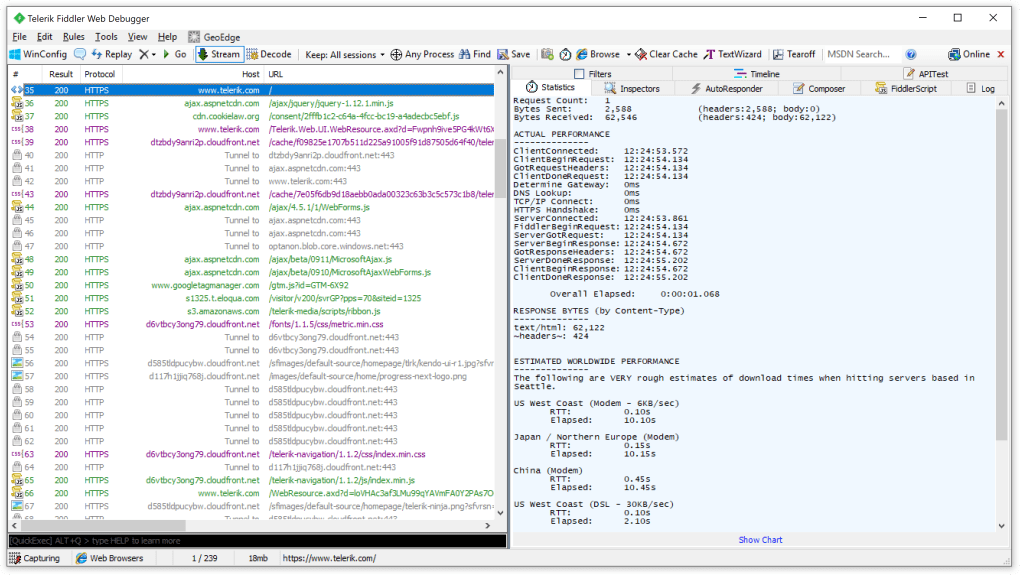
The core mission of Fiddler Everywhere is to give you a transparent view of every request that leaves your computer and every response that returns. By acting as a man‑in‑the‑middle proxy, it intercepts traffic, logs the full request/response cycle, and presents the data in an easy‑to‑read grid. You can drill down into headers, cookies, query strings, and even raw body content for both JSON and XML payloads. The built‑in Auto Responder lets you create mock responses on the fly, while the API Composer provides a drag‑and‑drop environment for building and testing API calls without leaving the application.
While the free tier of Fiddler Everywhere already includes the essential features—traffic capture, inspection, basic Auto Responder rules, and session saving—it does impose limits on the number of saved sessions, the quantity of Auto Responder rules, and collaborative project capabilities. For teams that need unlimited usage, Telerik offers a subscription‑based Pro plan that unlocks unlimited rules, cloud‑based session sharing, and priority support. Regardless of the plan you choose, the tool remains secure (all traffic is encrypted), regularly updated, and supported by a vibrant community that contributes extensions and custom scripts.
Key Features & Benefits
- Cross‑Platform Support: Native installers for Windows, macOS, and Linux; mobile apps for Android and iOS.
- Real‑Time Traffic Capture: Intercept HTTP/HTTPS requests from any application, browser, or device on the network.
- Full Request/Response Inspection: View headers, cookies, query strings, and raw bodies with syntax highlighting.
- API Composer: Drag‑and‑drop UI for building, testing, and grouping API calls without writing code.
- Auto Responder: Create mock responses, conditional rules, and grouped responses to simulate server behavior.
- Session Management: Save, export, and import captured sessions for later analysis or sharing with teammates.
- Collaborative Projects: Share sessions securely via the cloud, enabling distributed debugging across teams.
- Extensible Scripting: Use JavaScript or .NET scripting to automate repetitive tasks or transform traffic on the fly.
- Secure Authentication: Sign in with email, Google, or Microsoft accounts; all traffic remains encrypted.
- Regular Updates & Support: Frequent releases that add new protocols, UI improvements, and bug fixes.
Each of these features addresses a specific pain point that developers commonly face. For instance, the cross‑platform nature eliminates the need to maintain separate debugging tools for Windows and macOS, while the Auto Responder eliminates dependence on a live backend when testing edge‑case error handling. The API Composer’s visual approach reduces the learning curve for newcomers to RESTful services, and the collaborative project functionality cuts down on the tedious process of emailing .saz files back and forth.
Moreover, Fiddler Everywhere integrates smoothly with CI/CD pipelines via its command‑line interface, allowing automated capture of network traffic during integration tests. The built‑in Filters panel lets you focus on specific domains or content types, which is especially useful when dealing with high‑traffic applications that generate thousands of requests per minute. Whether you are a front‑end engineer debugging AJAX calls, a mobile developer troubleshooting API latency, or a security analyst inspecting TLS handshakes, the feature set is designed to be both comprehensive and intuitive.
Installation, Usage & Compatibility
Getting Started – Download & Install
To begin, visit the official Fiddler Everywhere download page and select the installer that matches your operating system. Windows users can choose the .exe installer, macOS users download a .dmg package, and Linux enthusiasts have a .deb or .rpm option. The installer guides you through a standard setup wizard—accept the license agreement, choose an installation folder, and optionally create a desktop shortcut. After installation, launch the application; the first run will prompt you to create an account or sign in with Google/Microsoft. This authentication step is required even for the free version because session data is stored in the cloud for synchronization across devices.
Configuring the Proxy
Once logged in, Fiddler Everywhere automatically configures your system proxy settings. On Windows and macOS, the application updates the OS‑level proxy configuration; on Linux, you may need to manually set the http_proxy and https_proxy environment variables to point to 127.0.0.1:8866 (the default listening port). For mobile devices, enable Wi‑Fi proxy settings on your Android or iOS device and point them to the same IP address and port of the computer running Fiddler. This allows you to capture traffic from mobile apps and browsers without additional hardware.
Capturing Traffic
With the proxy active, simply browse the web or run your application. Fiddler Everywhere populates the Sessions pane in real time, showing each request as a row. Click a row to open the Inspectors view, where you can switch between Headers, Raw, JSON, XML, and WebSocket tabs. The Filters panel on the left lets you narrow the view by host, status code, or content type, which is invaluable when dealing with noisy traffic. To modify a request, right‑click a session and choose Replay → Edit & Resend, edit the payload, and send it again to see how the server responds.
Using Auto Responder & API Composer
To mock a server response, navigate to the Auto Responder tab, click Add Rule, and define a matching pattern (e.g., GET https://api.example.com/users/*). Choose a static response file or type a custom JSON payload directly in the editor. Save the rule, enable it, and any matching request will be intercepted and answered with your mock data.
The API Composer resides under the Composer menu. Here you can build a request by selecting the method, entering the endpoint, adding headers, query parameters, and a body. Press Send to execute the request and view the response instantly—no need to switch to a separate tool.
Compatibility & System Requirements
Fiddler Everywhere runs on the following platforms:
- Windows 10/11 (64‑bit) – .NET 6 runtime
- macOS 11 (Big Sur) and later – Apple Silicon and Intel support
- Ubuntu 20.04+, Debian, Fedora, and other major Linux distributions
- Android 8.0+ (via companion app)
- iOS 13+ (via companion app)
Pros, Cons, Frequently Asked Questions & Final Verdict
Pros & Cons
- Pros:
- Free tier offers robust core functionality without time limits.
- True cross‑platform support eliminates the need for multiple tools.
- Intuitive UI with powerful features like Auto Responder and API Composer.
- Secure, encrypted traffic capture and cloud‑based session syncing.
- Extensible via scripting and command‑line integration for CI/CD pipelines.
- Cons:
- Free version limits the number of Auto Responder rules and saved sessions.
- Requires account login on every launch, which some users find inconvenient.
- Advanced scripting may have a learning curve for non‑developers.
- Occasional UI lag when handling extremely large capture files.
Frequently Asked Questions
Is Fiddler Everywhere really free?
Yes. The free tier provides unlimited traffic capture, basic inspection tools, and a limited set of Auto Responder rules and saved sessions. For unlimited features you can upgrade to the Pro subscription.
Can I use Fiddler Everywhere on macOS with Apple Silicon?
Absolutely. Telerik provides a universal binary that runs natively on both Intel and Apple Silicon Macs.
Do I need to install a root certificate for HTTPS traffic?
Yes. When you first enable HTTPS decryption, Fiddler Everywhere will prompt you to install its root certificate. This allows the proxy to decrypt and re‑encrypt secure traffic safely.
How does the Auto Responder differ from classic Fiddler?
The new Auto Responder groups rules, supports richer matching patterns, and integrates directly with cloud projects, making it easier to share mock responses across a team.
Can I capture traffic from mobile devices?
Yes. Configure your Android or iOS device to use the computer’s IP address and Fiddler’s listening port (default 8866) as a Wi‑Fi proxy. Install the mobile companion app for easier certificate management.
Conclusion & Call to Action
In summary, Fiddler Everywhere stands out as a versatile, secure, and truly cross‑platform debugging proxy that satisfies both newcomers and seasoned professionals. Its free version already packs enough power to diagnose most network issues, while the Pro subscription offers the scalability that larger teams demand. The intuitive UI, combined with advanced features like Auto Responder, API Composer, and cloud collaboration, makes it a compelling alternative to legacy tools that are limited to a single operating system.
If you are looking for a reliable way to download a free, secure web debugging tool that works on Windows, macOS, Linux, Android, and iOS, Fiddler Everywhere is worth trying today. Simply click the download button below, create a free account, and start capturing traffic in seconds. For teams that need unlimited mock rules and shared sessions, consider the Pro plan to unlock the full potential of this powerful proxy.
Download Fiddler Everywhere now and experience faster, clearer debugging for all your web and API projects.







